A Printed Poster or a Digital Banner: Two Different Reading Speeds
Compare a printed poster with a digital banner by distance, pace, and message load so each format carries information at a readable speed.
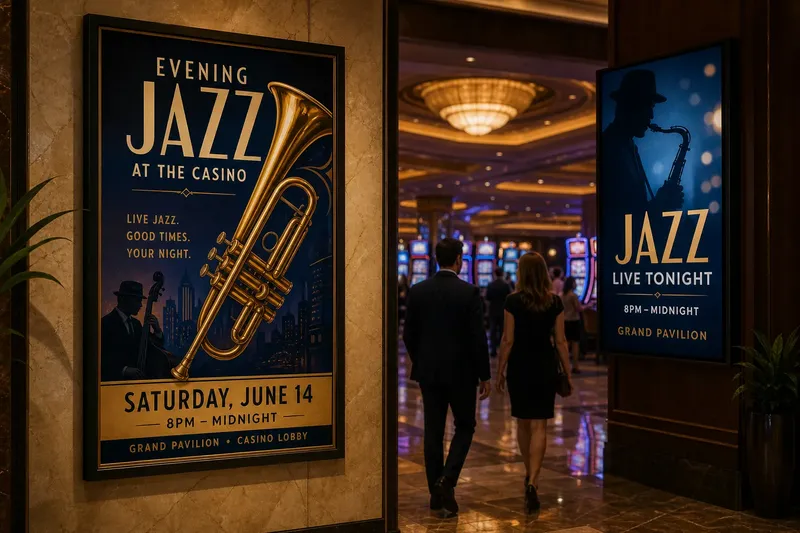
A printed poster and a digital banner lose readers for different reasons: one may be legible only from too close, while the other may change before its message lands. Choosing between them—or adapting one design for both—starts with the conditions in which people will see it, not with the dimensions of the file.
For casino-related promotions, the distinction matters because a poster in a lobby and a banner on a rotating display occupy different kinds of attention. Print holds still while a person approaches, pauses, or passes; a screen can change its contents, but each change spends time the viewer has to notice and read.
Distance determines the poster’s reading order
A poster is often viewed in motion. Someone crossing a lobby might catch its color and central image before reaching the headline, while someone waiting nearby may read the date and venue details. A layout that assumes every viewer stands directly in front of it gives the closest reader too much influence over the design.
The usual trouble is that small copy is set for the designer’s desk rather than the poster’s actual location. Fine print, decorative lettering, and tightly packed lines can look composed on a monitor, then collapse into texture across a room. The cause is often a hierarchy built by visual neatness instead of viewing distance.
Try grouping information into distinct levels: a short headline for the passing glance, a supporting line for a closer look, and practical details for someone who stops. Keep the main wording in a high-contrast area and avoid placing essential text over a busy photograph. If the poster will be seen from several directions, consider how the composition reads obliquely as well as straight on.
Say you are designing an invented poster for a fictional casino’s evening jazz event, to be mounted beside a lobby entrance. If the date and event name sit in small type beneath a detailed image of a trumpet, a passerby may register the instrument but miss the event. Moving the event name into a broad, clear band and reserving the lower area for the date should make the first glance more informative, while preserving detail for a closer view.
Check the poster from the distance at which people will first encounter it, not only at arm’s length.
A digital banner has a brief window to be read
A screen banner may be physically large, but its audience often gives it less time than a printed poster gets. On a lobby display, a visitor can look away as the next slide appears; in an online placement, the banner competes with nearby content and the reader’s immediate task. Screen size does not create attention by itself.
A common problem is fitting a poster’s full message into a banner and then animating it to make everything fit. The result can ask viewers to read one line, track a moving element, and remember a detail that has already disappeared. Usually the underlying cause is treating motion as extra space.
Give a banner one main message and make the supporting information brief enough to remain visible with it. If a display rotates through several panels, let each panel work on its own rather than splitting one sentence across transitions. A viewer who sees only part of the sequence should still understand the basic subject.
Motion can direct attention, but it should not carry information that vanishes before a comfortable reading pace. A simple fade or a restrained change in emphasis may be easier to follow than moving type or multiple competing effects. The exact pace depends on the display and its surroundings, so preview the sequence in the setting where it will run.
Keep the essential message on screen long enough for an unhurried reader.
Too much information overwhelms both formats differently
Overloaded print tends to become a wall of small type. Overloaded digital design tends to become a sequence of short-lived fragments. Both problems begin when every stakeholder’s preferred detail is treated as equally necessary, although the formats expose the clutter in different ways.
For a poster, the viewer can return to a line while standing nearby, but distance still limits what can be read at once. For a banner, a viewer may have less opportunity to return to earlier content, especially if it changes. In both cases, the design needs a clear distinction between what must be noticed and what can be left for another source or a later interaction.
Sort the message before setting type. Separate the central point, the useful supporting detail, and information that belongs elsewhere. A venue name or event date may be essential; a long description of the entertainment, a list of every feature, and several promotional conditions may not all belong in the same visual unit.
When a digital placement has a clickable destination, the banner can invite the reader to continue rather than carry every detail. A printed poster has no such built-in route, though it can still direct readers to a clearly named location or a simple address. Do not make a small code or fine-print instruction the only way to understand the basic offer.
Remove details that do not help the viewer identify the subject or decide what to do next.
Adapting one design to both formats creates mismatched priorities
A print layout does not become a screen banner simply because it has been exported in another file type. Print can use a larger field for layered reading and quiet detail; a banner needs a sharper focal point and must survive the screen’s cropping, brightness, and changing context. A direct resize often preserves the wrong priorities.
The usual symptom is a banner with tiny lettering and a crowded center, or a poster that feels strangely empty after its copy has been reduced to fit a short digital placement. The cause is a shared composition asked to serve two different reading situations. Replacing text with a smaller font may preserve the words while losing the audience.
Build separate compositions from the same visual identity. Keep the same headline, color palette, image treatment, and recognizable mark where appropriate, but change their scale and placement to suit the format. On a poster, a secondary line can sit beneath the headline; on a banner, it may need to be removed or integrated into the main line.
For screens, check how the design behaves in the actual display area rather than only in a full-resolution preview. A banner can be cropped by a placement, squeezed into a narrow slot, or surrounded by interface elements that compete with it. For print, inspect the final proof at a realistic size and lighting condition, since a color or weight that appears clear on a backlit screen may feel different on paper.
Retain the identity across formats; rebuild the reading order for each one.
Contrast and type behave differently on paper and screens
Designers often assume that a color combination that looks crisp on a monitor will hold up on a printed surface. Paper stock, ink, ambient light, and the viewing angle can soften distinctions; screens produce light and may be viewed amid reflections or glare. In either case, decorative contrast is not the same as readable contrast.
Another frequent snag is using thin, condensed, or ornate lettering for information that needs to be read quickly. Casino imagery often draws on marquee bulbs, engraved lettering, metallic finishes, or dramatic shadows. Those devices can establish atmosphere, but they can also make a date, venue, or call to action difficult to pick out.
Reserve stylized type for a brief headline or a decorative accent, then use a plain, sturdy face for supporting copy. Keep text and background distinct, and do not rely on color alone to separate two pieces of information. A shift in value, spacing, or a solid backing can help the message remain legible across different conditions.
Before approving either format, view it at its intended size and in its likely environment. For a screen, include the surrounding interface or nearby content in the preview; for print, consider the surface and the light falling on it. If the wording or production depends on a label, manufacturer instructions, or local rules, follow those requirements.
Which format fits this message best?
How much copy belongs on a printed poster?
Keep the poster to the information a passerby needs to recognize the event and decide whether to look closer. A concise headline, a short supporting line, and the essential practical details usually form a more usable hierarchy than a paragraph of promotional copy.
How long should a digital banner stay visible?
Allow enough time for a reader to notice the banner and read its essential wording without rushing. If the message needs a long sequence or repeated exposure to make sense, simplify it or use a more stable placement rather than asking motion to repair the copy.
Can the same artwork be used for print and screen?
The same image or brand elements can carry across both formats, but the composition usually needs to change. Rework scale, cropping, text placement, and the amount of copy so each version suits its viewing conditions.
What should be tested before a design is approved?
Check legibility at the intended viewing distance or screen size, then look at the design in its likely lighting and surroundings. Confirm that the main message remains clear when a viewer sees only one screen panel or catches the poster briefly in passing.
Choose the format by the viewer’s available attention
A printed poster suits a place where people can approach, pause, and return to details at their own pace. A digital banner suits a short message that can be understood during a limited viewing window, especially when the design has a clear focal point and little competing motion. Neither format is inherently more informative; each has a different capacity for sustained reading.
When deciding between them, start with the audience’s path: where the work appears, how quickly people pass it, and whether they can stop or revisit it. Then set the information load and reading order around that path. A poster or digital banner becomes easier to read when its design respects the attention it actually has, rather than the attention its maker hopes to receive.